FC 27 Rush Black Screen is a display issue that has been reported a lot by players recently, mainly occurring in Ultimate Team's Online Rush mode. If you've been running into this problem lately, below are some temporary workarounds that might help.
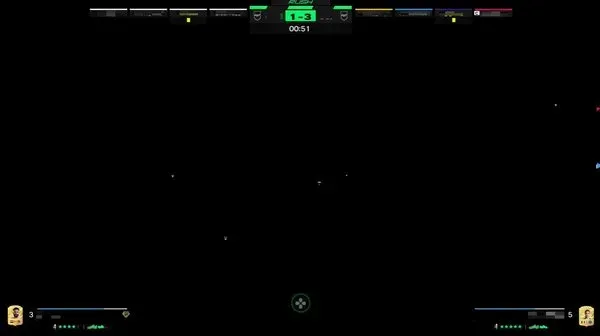
Specific symptoms
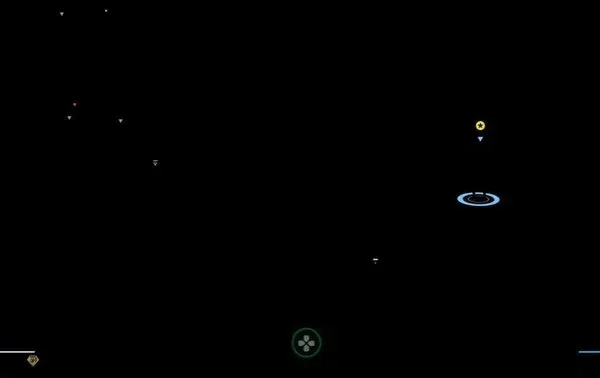
After entering a Rush match, the entire game screen suddenly goes black, and the pitch, players, ball, etc. all disappear—but it's not a normal black screen or crash.
You can still see the indicators above players' heads, usernames, and the match scoreboard, and you can even control your player. The match is actually still going on, but you can barely continue participating normally.
What are players saying?
As of November 4, 2026, most people are classifying the issue as a rendering glitch. There are multiple related reports on EA's official forums, mainly involving PS5 and Xbox.
The issue doesn't seem rare—some players say they've hit the black screen in multiple matches in a row.
Is there a fix?
One player shared a temporary workaround: after the black screen happens, pause the match, go into Highlights, wait for it to finish loading, then return to the match and it may recover.
This forces the game to re-render the visuals, bringing the pitch and players back on screen. However, the success rate is low right now, and even if it works, you may run into the same issue in the next match.
Has EA noticed or fixed it?
As of November 4, 2026, EA is aware of the FC 27 Rush black screen issue and has flagged it as a priority report, but there's no confirmed fix yet. They may still be investigating, or they may already have a fix in testing.
Bottom line: if you're dealing with this, you're still on your own for now. Rendering issues are a big job, and with multiple platforms affected, the EA team may need a lot of time to fully resolve it.
Can quitting the match fix the black screen?
Quitting the match alone won't fix the black screen, but exiting the match and restarting the game may temporarily restore normal display.
Quitting only ends the current game—it doesn't fix the game's rendering bug. If you quit too often, you may get hit with a DNF, which can cost you match rewards or even trigger Rush matchmaking cooldowns that temporarily prevent you from playing online.
You can try restarting the game after the match ends, but the same issue can still happen—it's not a reliable fix.
Until EA fully fixes this, play Rush as little as possible, and if you have objective tasks, try to complete them in other modes.